Anjanesh

Assignment Statements, Comparisons & Observations
Font: Size: + -
Showing posts with label Google. Show all posts

Audi Q6 car to launch in India in January 2050 @ 55.00 Lakh

Thursday, June 10, 2021
Google has comea long way in answering questions in search instead of just returning some text search results from a webpage. But from where does Google query answers ? They must have some sort of complex algorithms detecting answers based on the search query, right ? I really would be interested in knowing how they analyse text to predict answers. Because a search query on audi q6 shows that the car will launch 30 years from now.

How to upload a web-font to Google Cloud Storage and use it in your CSS

Wednesday, December 26, 2012

Replace [bucket] with your bucket name.

  1. Use fontsquirrel's @font-face Generator to download all the font formats required for various browsers.
  2. Upload the fonts to Google Storage :
    gsutil -h "Vary:Accept-Encoding" -h "Cache-Control:public,max-age=31536000" cp -a public-read font-webfont.eot gs://[bucket]/fonts/font-webfont.eot
    gsutil -h "Vary:Accept-Encoding" -h "Cache-Control:public,max-age=31536000" cp -a public-read font-webfont.woff gs://[bucket]/fonts/font-webfont.woff
    gsutil -h "Vary:Accept-Encoding" -h "Cache-Control:public,max-age=31536000" cp -a public-read font-webfont.ttf gs://[bucket]/fonts/font-webfont.ttf
    gsutil -h "Vary:Accept-Encoding" -h "Cache-Control:public,max-age=31536000" cp -a public-read font-webfont.svg gs://[bucket]/fonts/font-webfont.svg

    Now your font is accessible at http://[bucket].commondatastorage.googleapis.com/fonts/font-webfont.eot or http://[bucket].commondatastorage.googleapis.com/fonts/font-webfont.ttf etc.

  3. Apply the code to your CSS.

    @font-face {
        font-family: 'fontFamilyName';
        src: url('http://[bucket].commondatastorage.googleapis.com/fonts/font-webfont.eot');
        src: url('http://[bucket].commondatastorage.googleapis.com/fonts/font-webfont.eot?#iefix') format('embedded-opentype'),
             url('http://[bucket].commondatastorage.googleapis.com/fonts/font-webfont.woff') format('woff'),
             url('http://[bucket].commondatastorage.googleapis.com/fonts/font-webfont.ttf') format('truetype'),
             url('http://[bucket].commondatastorage.googleapis.com/fonts/font-webfont.svg#aller_displayregular') format('svg');    
        font-weight: normal;
        font-style: normal;
    }
  4. Unfortunately the last step is not enough to display the web-font on your website since the fonts need to be on the same domain as the website.

    In order to allow web-fonts to be hosted elsewhere, the location of the web-fonts must have a Access-Control-Allow-Origin header sent.

    For Google Storage, we do this :

    <?xml version="1.0" encoding="UTF-8"?>
    <CorsConfig>
      <Cors>
        <Origins>
          <Origin>http://mydomain.com</Origin>
        </Origins>
        <Methods>
          <Method>GET</Method>
          <Method>HEAD</Method>      
        </Methods>
        <ResponseHeaders>
          <ResponseHeader>x-goog-meta-foo1</ResponseHeader>
        </ResponseHeaders>
        <MaxAgeSec>1800</MaxAgeSec>
      </Cors>
    </CorsConfig>

    Save this as font.xml.
    Hmmm ... Google says :

    gsutil setcors <cors-xml-file> uri

    But using gsutil, we can set CORS to an entire bucket only and not to an object.

    gsutil setcors font.xml gs://[bucket]

    not uri as mentioned

    Similarily, for getcors :

    gsutil getcors gs://[bucket]
    and not
    gsutil getcors gs://cats/mycats.png

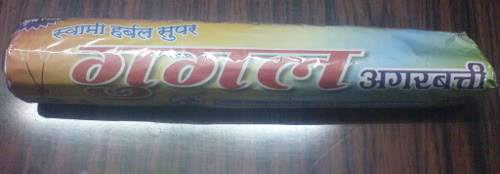
Google Agarbatti (Incense)

Monday, October 25, 2010

My friend Sudhir bought this from the local store.

google agarbatti

Read : Google Agarbatti. (Agarbatti = Incense)

Update : Thanks to Sumit Ashok Kesarkar for the clarification. its Gugal which means Guggul == made from the sap of the plant "Commiphora mukul"

Email Newsletter Subscription via GFC & GAE

Wednesday, July 28, 2010

There is one major limitation when sending out legit mass emails via SMTP ("compose") - a daily cap on the number of emails allowed to be sent from a mailbox. This applies to most e-mail service providers.
Google Apps Standard, the free edition, allows a maximum of 500 outgoing mails per day for each user id.
Even the Primier edition which costs $50 per user a year limits outgoing mails at 2000 per day for every email id.

There are two cost-effective ways to send out newsletter emails via Google's services - Google Friend Connect (GFC) and Google App Engine (GAE).

Google Friend Connect

subscribeA lot of people are not unaware of the fact that you can actually send out newsletters for free to your subscribers via Google Friend Connect (GFC).
The catch is that the users have to be susbcribed exclusively via Google's Subscribe button without which there is no way for the newsletter to reach the user.
This is really a tough catch as you got to have it's subscribe button right from launch date.
Its a major turnoff, especially when a website collects registration infomation via a form and sends the data to a database, after which emails are sent separately.
Most email marketing systems like aweber, mailchimp, emailbrain, constantcontact, madmimi etc have the option to add subscribers manually externally.
And with GFC, you would not be able to retrieve the subscribed users' email ids via the control panel - export gives only names, ids, open id urls and thumbnail images.
So, at a later point in time, if you decide to switch to another email marketing system, you would need to send one last email asking them to re-subscribe to a new system.
Another bad news is that the subscriber's email address must be an open id ! (google a/c, yahoo a/c, twitter, AIM, netlog or any other openid)
Looks like all bad news, but if you think from the users' perspective, this is a good deal.
Its secure since there is no way for emails to be leaked accidentally.
Its safe because there is no room for errors in accidentally sending out mails to users who have unsubscribed.
Regarding the sender / from email address - It would be the same as the google account username. So if you don't want it sent from myusername@gmail.com, then create a google account under your app id. (This dual account chaos would be resolved soon : Google Apps Accounts Will Also Be Personal Google Accounts)
GFC is straigtforward, only bit of major work required is getting the audience to hit the google subscribe button.

Google App Engine

If you are not convinced with GFC then check out GAE - Google App Engine.
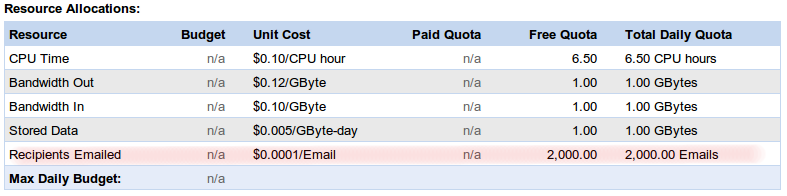
It has a daily free quota of sending emails to 2000 recipients. Link
After that, its billed at $0.0001 per recipient - thats just $1 for sending to an additional 10,000 recipients which can execute in about 2 minutes ! Link
But you've got to code to take advantage of GAE and your website should most probably be powered by GAE as well.
subscribe

Google Groups

Then there is always google's mailing list at google groups.
subscribe
But this cannot really be act a newsletter system.

If you want to submit ideas / suggestions to the Google team for its products, you can submit or vote at Google Product Ideas which is open to the public.

GMail Unbeatable

Wednesday, October 24, 2007
GMail

When Gmail was first launched in 2004, its most attractive features were fast AJAX interface and POP+SMTP ! Though Microsoft Email clients like Outlook & Express managed to emulate POP & SMTP for Hotmail accounts, POP+SMTP was not really available. But above all, it was Gmail's initial 1GB and growing storage capacity what really lured people to using it. By 2007, with space of almost 3GB and 10GB for the paid versions, Google has recently increased their capacity to 4GB (targetted to 6GB by Jan '08) and 25GB for paid versions.

And now for the most anticipated feature of all - IMAP. Thats right. Google has just started rolling out IMAP for gmail accounts. This may not come as a very big excitement for most users, but it definitely does for developers who can now access gmail accounts directly via the IMAP protocol. The only other free service that was providing this so far, was AOL.

There may have been a lack of new services by Google this year, but if definitely seems to be improving their existing ones dramatically. After all, it reached the $600 a share mark a couple of weeks back and is close to $670 as of now.

Adwords for Indian City names

Saturday, March 24, 2007
Google has a Keyword Tool thats seems to be the beginning of the ending of Overture's Bid Tool. It has an interesting feature called Cost and ad position estimates which states that : Review the predicted status, average cost-per-click, ad position, and search volume values for ads appearing for your keywords. The estimates provided are based upon the maximum CPC you enter. So if you are willing to spend a maximum of 0.5 USD per click for the keyword Kerala, you'll get suggested values for Estimated Average CPC and Estimated Ad Position for the given keyword and related keywords from Google's algorithm. I had a list of potential keywords & their max CPC value and ran through the tool to retrieve their related/suggested keywords. I then checked for occurrences of Indian state/city/district names in the list of related keywords. Note : This list does not show the average CPC for Indian city names - because it varies based on the maximum CPC for a keyword that we enter. This is just the total number of times it occurs in my list. This is a rough estimation but I guess the overall percentage should be similar if I had a much bigger list. Some keywords could've got mixed-up with other keywords. For example, Hardwar shows 3224 but this obviously incorrect since its got mixed up with words containing Hardware.
Indian City, State or DistrictOccurrence%
Ranchi873925.2
Hardwar32249.3
GOA26437.6
Diu25277.3
Rewa22046.4
Nadia22036.4
Agra21216.1
Puri18595.4
Kota13063.8
Punch10042.9
Salem8922.6
Bid8172.4
Chandel7162.1
Banda6812
Guna4411.3
Thane3781.1
Basti3341
Latur3230.9
Leh2920.8
Alwar2370.7
Etah2300.7
DELHI1960.6
Pali1740.5
Tonk950.3
Bangalore870.3
Erode750.2
Theni630.2
Mandi570.2
Morena570.2
Hyderabad540.2
Mumbai520.2
Chennai470.1
New Delhi440.1
Solan420.1
Baster360.1
PUNJAB350.1
Dhar330.1
Pune300.1
Mahe210.1
Anand190.1
Godda170
KERALA150
Krishna150
Harda130
Jaipur120
Ambala100
Betul100
Daman90
Saran90
Almora80
Mansa80
Gaya70
GUJARAT70
Hassan70
Baran60
Gonda60
Gurgaon60
ORISSA60
Surat60
ASSAM50
WEST BENGAL50
ANDHRA PRADESH40
KARNATAKA40
Kolkata40
Satara40
Durg30
MANIPUR30
Moga30
Sagar30
Yanam30
Cachar20
Chandigarh20
Chatra20
Indore20
Lucknow20
MAHARASHTRA20
Mysore20
Patan20
TAMIL NADU20
Umaria20
UTTAR PRADESH20
Washim20
Aligarh10
Allahabad10
Banka10
Bhopal10
Chamba10
Coimbatore10
Ghaziabad10
Hamirpur10
Haora10
HARYANA10
Haveri10
Jalandhar10
Jamnagar10
Jind10
Kancheepuram10
Kanker10
Kargil10
Kurukshetra10
Lalitpur10
Madurai10
Maldah10
Medak10
Nagpur10
Panna10
Patna10
RAJASTHAN10
Sikar10
SIKKIM10
South Goa10
Vellore10
Visakhapatnam10
Warangal10
Enjoy Geo-Targetting !

Borat = Over Famous ?

Friday, December 29, 2006
Borat So we all now know about Borat, the new Andy Kaufman, after his movie Borat: Cultural Learnings of America for Make Benefit Glorious Nation of Kazakhstan. But how famous has Borat become on Google ? So famous that if you type "myspace" in Google, the second entry is Borat's MySpace profile ! I cross checked with all of Google's servers and the result was the same : 2nd position [29th Dec 2006] after which the rest of the main myspace links show up like vids.myspace.com, login.myspace.com, music.myspace.com, collect.myspace.com and home.myspace.com ! Though site:myspace.com doesnt have the borat link in the top 100 in Google.

Google Apps for Domains

Friday, December 22, 2006
Ok, this may be old news, but this is intended for Indian individuals/startups especially non-IT ones. There is one thing I find common in a lot of individual freelancers/businessmen and very tiny-sized companies in India. The have their domain name registered for their official use yet disclose only their gmail account to others esp on the internet. I've seen at various places (joblistings, classifieds, realestate etc) where there is a proper website associated with the post but the contact email address given is their gmail email address. I've seen replies like "Is this a real company ?", "At least get a proper email address". People tend not to respond if the email address is that of free one thinking its not a reputed company. But there are genuine people who just don't yet have enough of their initial capital. The advantage of gmail over having to deal with their domain email is pretty obvious since Google has put tons of effort on Gmail. 1. Spam. This is probably the most relevant reason since Gmail would block better than webhosts giving their own spam solution. 2. Space. Cost is a factor and given the number of emails pouring in, you probably wouldnt have enough email storage at your host and will either end up POP-deleting or buying extra space. We all like to keep a copy of almost everything on the internet now-a-days and buying extra space for a startup wouldnt be the next choice of investment. Gmail's almost-3GB is definitely more eye-catching. 3. Control Panel. The last few email control panels on webhosts I've used were GoDaddy's, 1and1's, Horde, Squirrel, NeoMail. All are good but nothing is really good enough is it? You defintely have far better and more features in Gmail, esp the conversation layout. Plus, Google will always self-update, while we got to depend and wait on the webhost for updates. 4. Free POP/SMTP. The advantage is over other free email providers like Y! etc where POP and SMTP are paid services. Others like HotPoP have some sort of limits on the number of mails transferred. G does not stand for God. 1. The biggest disadvantage of Gmail is ofcourse, not being able to create folders. 2. Sponsored Ads. But then....thats the whole idea for their free service. 3. Privacy. The whole world knows they use our data for their own statistics. 'Free' is their marketing technique. Unless your emails are really 'top secret', I don't see the need to worry on this. Google Apps for Domains (http://google.com/a) is targetted for small-size organizations to have their basic needs like emails, calendar, startup page and chat setup all by Google for free. The only thing you got to is buy a domain name and point to Google's servers. This is the best solution for the individuals/tiny-sized companies I mentioned about earlier. Reaons for using: 1. Your prime purpose is ofcourse email visibility which would reflect something like mail@yourdomainname.com or jobs@yourdomainname.com. 2. You could still have yourdomainname.com pointing to a webhost (Google is not really acting as a webhost here) containing a real site, or you could have a template-based site at Google Apps for Domains. The only problem with this is that you cannot edit the hompage's main template. You can have a custom look for the rest of the pages by uploading files. Ultimately, this provision was made for your business to kick-start - not to host heavy dynamic stuff. 3. You can create a startup page for the people who you've partnered with or hired to access their mails, calendar, chat for which you can create separate accounts. The few people who are working with you, can interact in the same circle easily reducing any ambiguity. The startup page can be of different layouts and include various widgets which you can integrate to your site. If you want your custom widget, you can host it at some webhost or maybe even at Google Apps for Domains (it should work since you're uploading an XML file). Creating a widget is not that much of a headache for a web-developer who is into XML and JavaScript. 4. Google is likely to add more services soon, so these 4-5 services aren't the last. I guess this should be more than enough to really make a ignite your business on the internet-point-of-view.

Warren Buffet NOT = Billionaire ?

Friday, December 15, 2006
I was searching for the video Liz Claman's interview with billionaire Warren Buffet that took place a few weeks ago. The best I could come up with was obviously at YouTube, though the original videos can be found in parts & segments at CNBC website which requires you to be registered too. The interview was apparently titled Warren Buffet The Billionaire Next Door. Now, searching for the interview title warren buffet the billionaire next door in Google, this is what Google's Did you mean had to suggest : Come on Google, I'm a big fan of G, but you should atleast get the billionaires names mapped correctly !